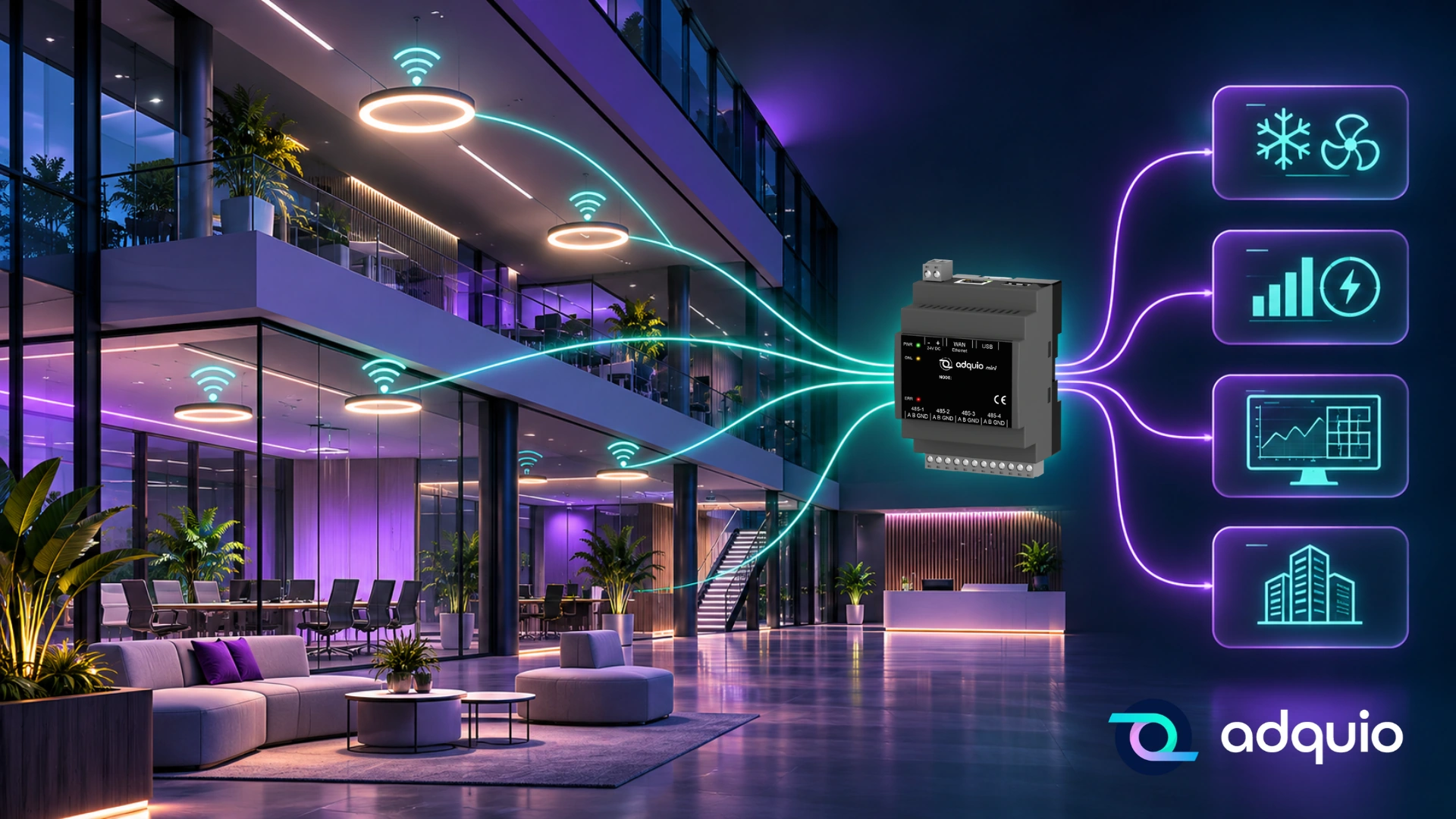
Imagine the lights in your building communicating with HVAC, sharing information with the energy management system or responding automatically to events in other installations.
Imagine a Casambi presence sensor doing more than switching on a luminaire: it also tells the building that a room is occupied.
Or imagine controlling the lighting on every floor of a hotel, checking temperatures, monitoring consumption and activating complete scenes from a single screen.
All while making use of the installations you already have.
This is what happens when we integrate Casambi into a BMS.
Although the technology may seem complex, the idea is simple: help lighting work together with the rest of the building.
First, what is Casambi?
Casambi is a wireless lighting control technology based on Bluetooth Low Energy.
It lets you control luminaires, dim lights, create scenes, manage groups and configure automation without installing a communications cable between every device.
Its flexibility makes it a useful option for hotels, offices, museums, shops, restaurants and many other spaces.
For example, a shop can create different scenes to highlight products, adapt lighting to opening hours or change the atmosphere of a shop window.
A hotel can control lighting in guest rooms and shared spaces.
A museum can adapt each room to the needs of the works on display.
All of this can be done through the Casambi app and compatible control devices.
But what happens when we also want that lighting to communicate with HVAC, electricity meters or the building’s overall management system?
That is where the BMS comes in.
What does integrating Casambi into a BMS mean?
BMS stands for Building Management System.
A BMS monitors and coordinates installations such as lighting, HVAC, energy and other technical systems.
Integrating Casambi into a BMS means enabling the building’s overall system to exchange information and commands with the lighting installation.
The two systems can then work together.
For example:
- The BMS can check the status of Casambi lights.
- It can send commands to switch them on, switch them off or dim them.
- It can activate lighting scenes in response to events in the building.
- It can use information from Casambi sensors for other automation.
- It can represent lighting on floor plans and supervision screens.
- It can include available installation data in its analytics systems.
The specific functions depend on the devices, available data and type of integration used.
Casambi continues doing what it does best: controlling lighting. It can now work with everything else, too.
A simple example: a smart meeting room
Imagine a meeting room that uses Casambi to control its lighting.
It has dimmable luminaires, several scenes and a presence sensor.
Without BMS integration, the lighting can work perfectly well: when someone enters, the lights come on; when the room is empty, they switch off after a set time.
But HVAC has its own controller and does not know whether the room is occupied.
Now we connect Casambi to the BMS.
When the sensor detects presence, that information can reach the building’s overall system.
The BMS uses it to apply an HVAC strategy suited to occupancy.
When the room becomes empty, the lights can switch off and HVAC can move to a lower-consumption mode, respecting the configured delays and comfort conditions.
One event can help manage two different installations.
We have made better use of an existing presence sensor without adding another one.
This is one of the most important benefits of integrating technologies.
What are the benefits of connecting Casambi to the rest of the building?
1. One interface for managing different installations
Imagine a ten-storey hotel.
Lighting runs on Casambi, HVAC uses another system and electricity consumption is checked in a separate application.
The maintenance manager needs several tools to understand the status of the installations.
With suitable BMS integration, that information can be brought together in a centralised interface.
From one screen, they can select a floor, check lighting, view temperatures and review consumption.
They can even use interactive floor plans where each area shows its status.
The building can be managed as a coordinated whole.
2. Automation beyond lighting
Casambi scenes create lighting environments suited to different activities.
What if a scene could also trigger actions outside the lighting system?
Imagine a restaurant with a scene called “Dinner”.
Activating it sets the lighting to the desired levels.
If Casambi is integrated with the BMS, the same action can be used to adjust HVAC, change blind positions or activate other compatible equipment.
The same approach could be used with a “Presentation” scene in a conference room.
The lights dim, the blinds lower and HVAC adopts the defined settings.
A single action can coordinate different building technologies.
This opens up useful possibilities for hotels, commercial spaces and corporate buildings.
3. Make better use of sensors
Sensors are among the most valuable elements of a smart installation.
A Casambi presence sensor can provide useful information about whether a space is occupied.
A light sensor can indicate how much daylight an area receives.
When these data are integrated into a BMS, they can support broader strategies.
For example, presence can inform HVAC management, while daylight levels can help coordinate lighting and solar shading.
You do need to check which information each sensor exposes and how the integration system can obtain it.
The important point is that a sensor can support more than one building function.
4. Manage multiple Casambi networks
A single Casambi network may be enough for a small installation.
Now consider a hotel, shopping centre or office building with several floors and hundreds of luminaires.
Lighting is often distributed across different networks.
Even if each network works correctly, the building manager may need an overall view.
BMS integration can bring information and control from several networks into a common environment.
The installation can then be organised by building, floor, space or zone, without requiring users to manage each network independently.
5. More information to improve energy efficiency
Lighting accounts for part of a building’s energy consumption.
When Casambi is connected to a management platform, schedules, dimming levels, statuses and other available data can be analysed.
This can reveal areas that remain lit unnecessarily or spaces where schedules could be improved.
When suitable power data are available, more advanced energy analysis can also be included.
Switching lights off is only one possible action.
The goal is to understand how lighting is used and identify real opportunities for improvement.
How is Casambi technically connected to a BMS?
You do not need to know every technical detail to understand it.
A simple way to picture it is that Casambi and the BMS speak different languages.
Casambi uses its own wireless communications technology.
Meanwhile, many building management systems use protocols such as BACnet, Modbus or MQTT.
To exchange information, they need something that acts as a translator.
That element is usually called a gateway.
The gateway enables a Casambi network to communicate with other systems.
There are several ways to establish that connection.
Through a local gateway
A compatible gateway communicates with the Casambi network and provides access to its functions and data over a local connection.
This is useful when lighting and automation need to exchange information without depending on Internet access.
Through cloud services and APIs
Casambi Cloud services and its API can also be used to exchange data with external platforms.
This can be useful in certain projects, particularly when remote services need to be integrated.
However, it depends on connectivity and the services used.
Through other gateways and protocols
Depending on the available hardware, integrations based on DALI, BACnet or other technologies may also be used.
There is no single architecture that suits every building.
The choice depends on the installation, the existing BMS and the functions required.
Adquio: the bridge between Casambi and the rest of the building
At Adquio, we have spent years developing solutions that help Casambi installations extend beyond lighting.
Our approach is simple:
Connect what already works and extend its possibilities.
We combine communications gateways, programmable controllers, supervision tools and analytics to make that possible.
Step 1. Connect Casambi networks through Lithernet
Lithernet gateways provide bidirectional communication between Casambi networks and Adquio controllers.
Communication takes place locally, without sending data to external services to control the lighting.
Each Casambi network uses its corresponding Lithernet gateway.
The Adquio controller can then receive information from the networks and send supported commands.
Step 2. The Adquio controller coordinates technologies
Once the Adquio controller receives Casambi information, it can use it in automation and share it with other systems.
This is where many of the most useful possibilities begin.
For example, a Casambi presence sensor can participate in HVAC automation.
An external command can activate a lighting scene.
Or a condition detected in another system can trigger changes in the luminaires.
Adquio controllers support different protocols, such as Modbus, BACnet and MQTT, and allow operating logic to be tailored to each project.
The controller becomes the meeting point for technologies that previously operated separately.
Step 3. Connect the whole installation to the BMS
Once Casambi variables are available in Adquio, they can be incorporated into the building’s management platforms.
If the client uses Adquio Cloud BMS, integration can take place within the ecosystem itself.
If they already have a BMS from another manufacturer, we can exchange information through compatible protocols suited to the project.
This means the existing BMS does not need to be replaced to bring Casambi lighting into its management.
In many cases, adding the necessary communications components and configuring the integration correctly is enough.
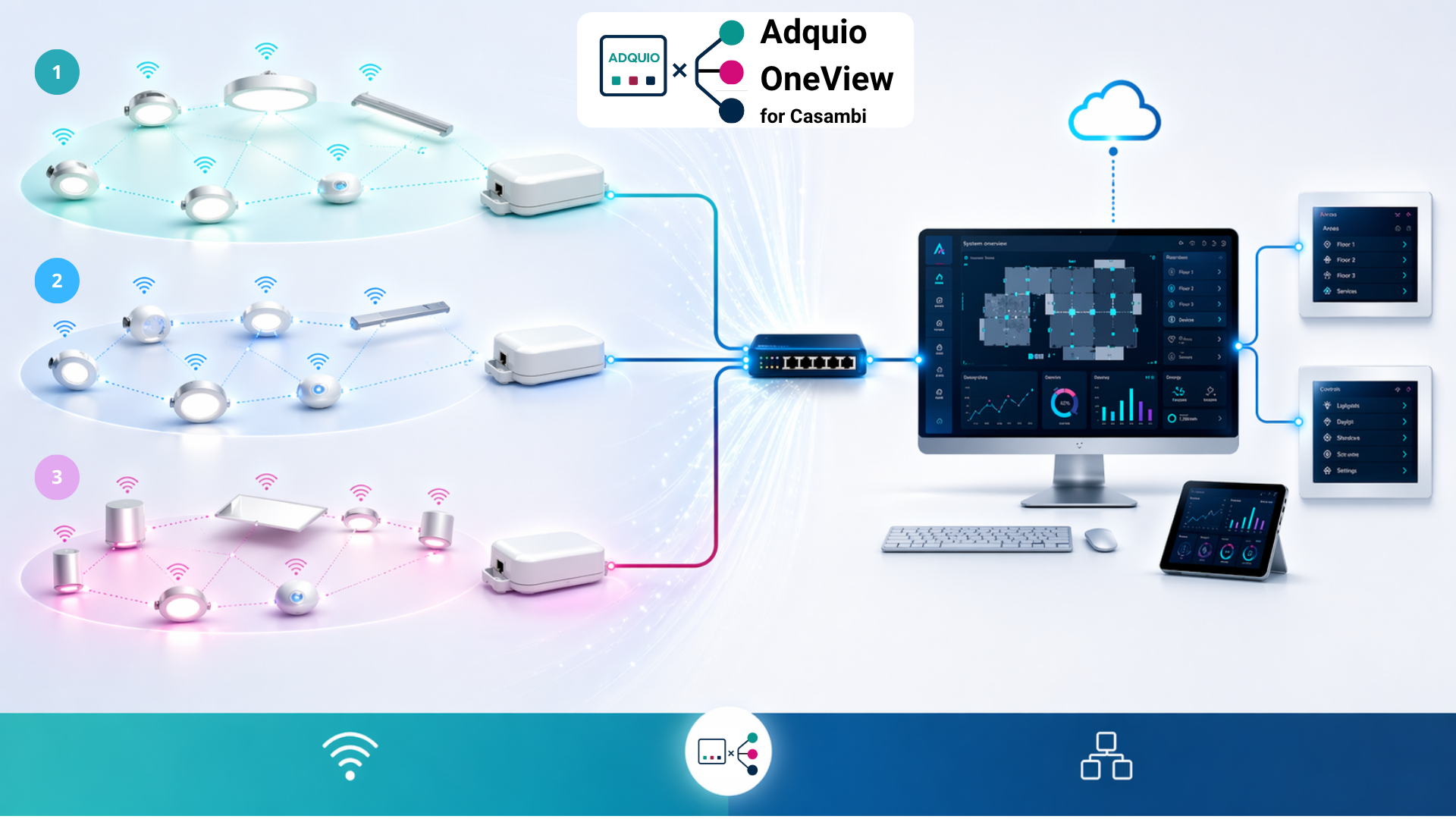
Adquio OneView for Casambi: several networks, one view
Large Casambi installations often contain numerous independent networks.
Consider a hotel where each floor uses several networks, or a shopping centre with different retail areas.
Managing them individually can make supervision and maintenance more difficult.
We developed Adquio OneView for Casambi to address this situation.
OneView consolidates information from multiple Casambi networks and presents them as an organised whole.
The aim is to give the building manager an overall view, even when many independent networks operate behind it.
That information can be used in control displays and SCADA systems, and incorporated into other management platforms through the available interfaces.
For example, all lighting zones can be represented on an overall building plan instead of checking ten networks separately.
For the user, there is one building rather than ten separate networks.
That is how the experience should feel.
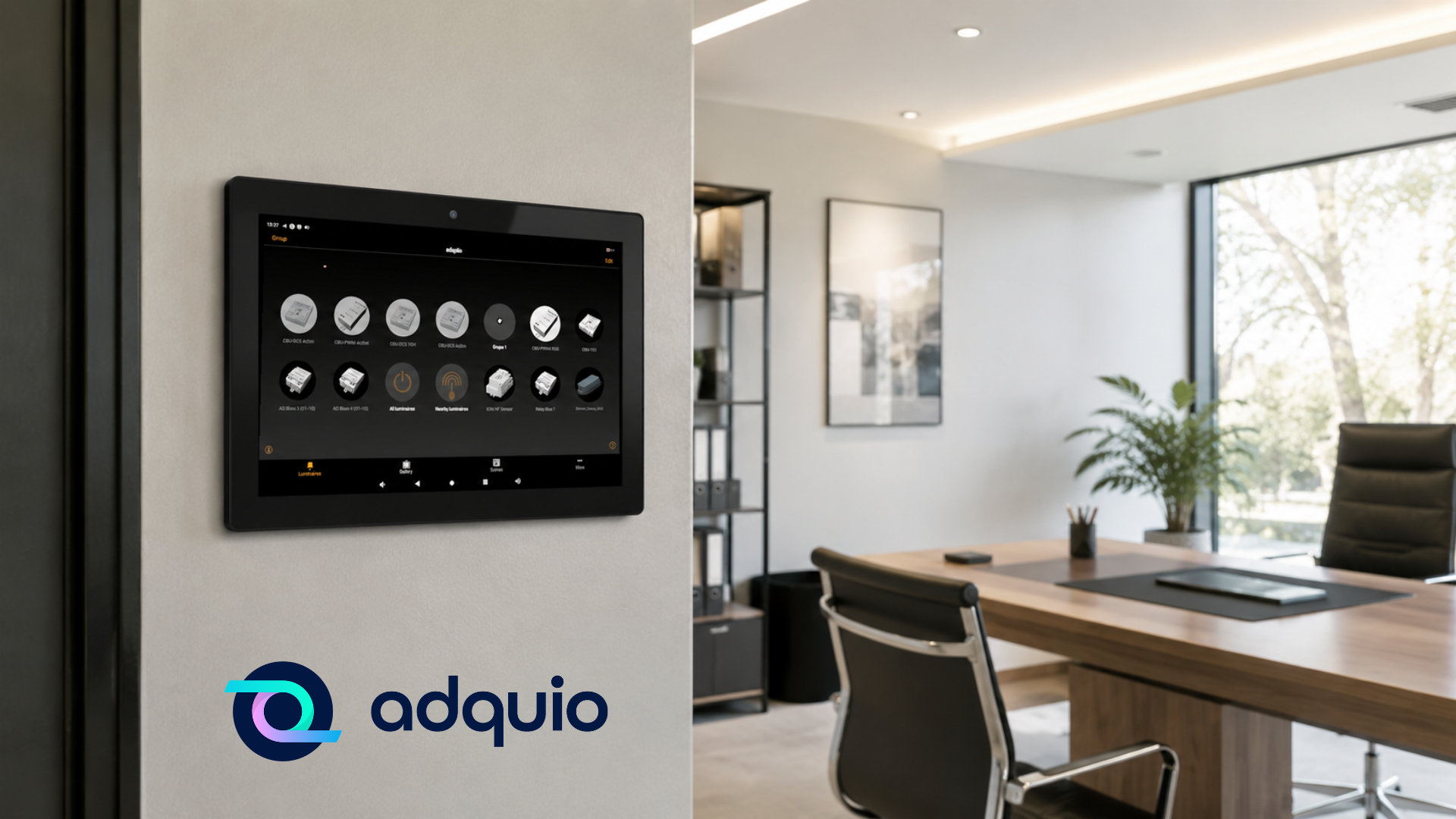
Adquio SCADA: see Casambi on the building’s floor plans
Once lighting is integrated, we can represent it through Adquio SCADA.
Imagine a screen showing a hotel floor plan.
Each guest room and shared area has visual lighting indicators.
The operator can see which areas are lit, check dimming levels and activate scenes according to the configured permissions and capabilities.
HVAC, energy and other system information can be displayed too.
This combination helps maintenance teams work with information they can understand.
They do not need to know each device’s communications address.
They simply select the area they want to monitor or control.
With Adquio SCADA Server, these capabilities can remain within the local infrastructure.
With Adquio SCADA Cloud, remote supervision and control are available through a cloud-hosted platform.
What if we want to analyse lighting consumption?
We can take another step.
With Adquio PowerTrace for Casambi, we can estimate luminaire energy consumption using information about their electrical characteristics and operation.
This provides energy information without necessarily installing a physical meter for every luminaire.
PowerTrace performs calculations and estimates based on the available data. It does not replace certified metering where that is required.
The data can be used to analyse consumption by area, study trends and identify opportunities for optimisation.
With Adquio Analytics, we can create dashboards, charts and indicators that make lighting operation easier to understand.
Combining Casambi, PowerTrace and Analytics creates useful possibilities for installations where energy improvements need to be assessed or different operating periods compared.
A complete example: a hotel with Casambi lighting and a BMS
Imagine a hotel with 120 rooms, restaurants, meeting rooms and shared spaces.
Its lighting uses several Casambi networks.
HVAC has its own equipment and control systems.
The hotel also has electricity meters and environmental sensors.
The goal is to integrate all that information into a centralised management platform.
How could Adquio address this?
First, we connect the Casambi networks through Lithernet gateways.
Next, Adquio controllers receive the information and share it with HVAC, energy systems and the hotel’s automation.
Then, we use OneView for Casambi to organise and consolidate the different lighting networks.
Finally, we incorporate the information into SCADA and BMS so authorised staff can supervise installations through a common interface.
What does this achieve?
The maintenance manager can check the status of lighting and other equipment without visiting every floor.
A Casambi scene can be coordinated with other installations.
Sensors can provide useful information for different automation tasks.
And management can obtain data to better understand energy consumption.
All while retaining Casambi technology and its original functions.
What happens if the Internet connection is lost?
This is one of the most important questions in building automation.
Casambi is designed to run many control functions locally within its networks.
If Lithernet gateways and Adquio controllers provide the local integration, they can continue exchanging information without Internet access, provided the equipment, power supplies and local network remain operational.
Cloud-dependent services naturally require connectivity.
That is why it is important to decide from the outset which functions need to remain local and which can depend on external services.
A smart building should also be prepared to keep operating when its external connection fails.
Do I need to replace my Casambi installation?
No. That is one of the main benefits.
If you already have a Casambi installation, in many cases you can connect it to a BMS by adding the necessary gateways, controllers and configuration.
Luminaires, sensors, scenes and groups can continue to be used.
You can build on what you already have and give it new capabilities.
The project can also be carried out in phases.
Start by integrating one area or network, expand to others, then add supervision, analytics or advanced automation functions.
When is it worth integrating Casambi into a BMS?
Several situations make this integration especially valuable.
When you have multiple Casambi networks and want to manage them centrally.
When the building already has a BMS and lighting needs to become part of its operation.
When you want to use Casambi sensors to improve other installations.
When you need to coordinate lighting scenes with HVAC, blinds or other equipment.
When you want to visualise all lighting through SCADA.
Or when you need more information to analyse consumption and improve energy efficiency.
The integration can be simple or highly advanced, depending on requirements.
What matters is having a clear project objective.
Casambi is a powerful lighting solution. Integrating it with a BMS expands its possibilities.
Lighting is an essential part of any building.
It operates alongside many other systems.
People occupying a room need light and a suitable temperature.
A hotel needs lighting scenes, as well as coordination of schedules, occupancy and energy consumption.
A maintenance manager needs to understand what is happening across the installation.
That is why we see integration with the rest of the building as a natural next step for a Casambi installation.
Casambi provides flexible, powerful lighting technology. A BMS allows that lighting to take part in much broader management.
Adquio connects the two.
From a small installation to a building with numerous Casambi networks, our solutions integrate, monitor, control and analyse lighting alongside the other technical systems.
You can retain existing infrastructure, combine different technologies and choose our management platforms or compatible systems from other manufacturers.
Smart lighting is valuable. Lighting that works with the whole building offers even more possibilities.
Do you have a Casambi installation you would like to integrate with your BMS?
At Adquio, we can help assess your project and find the most suitable architecture.
Your lighting is already smart. Now it can become part of a smart building.
Connect Casambi to your building
Tell us how many Casambi networks you have and which systems they need to work with.