Temperature from the device itself
The integrated sensor provides the room temperature. Display its reading, the setpoint and the controls defined for the project’s HVAC system.

OPEN THERMOSTAT · ROOM CONTROL
One room. Multiple possibilities.
Measure temperature and manage comfort through a 4″ touchscreen. Integrate lighting, blinds and room services through a customisable interface and open connections to the rest of the building.
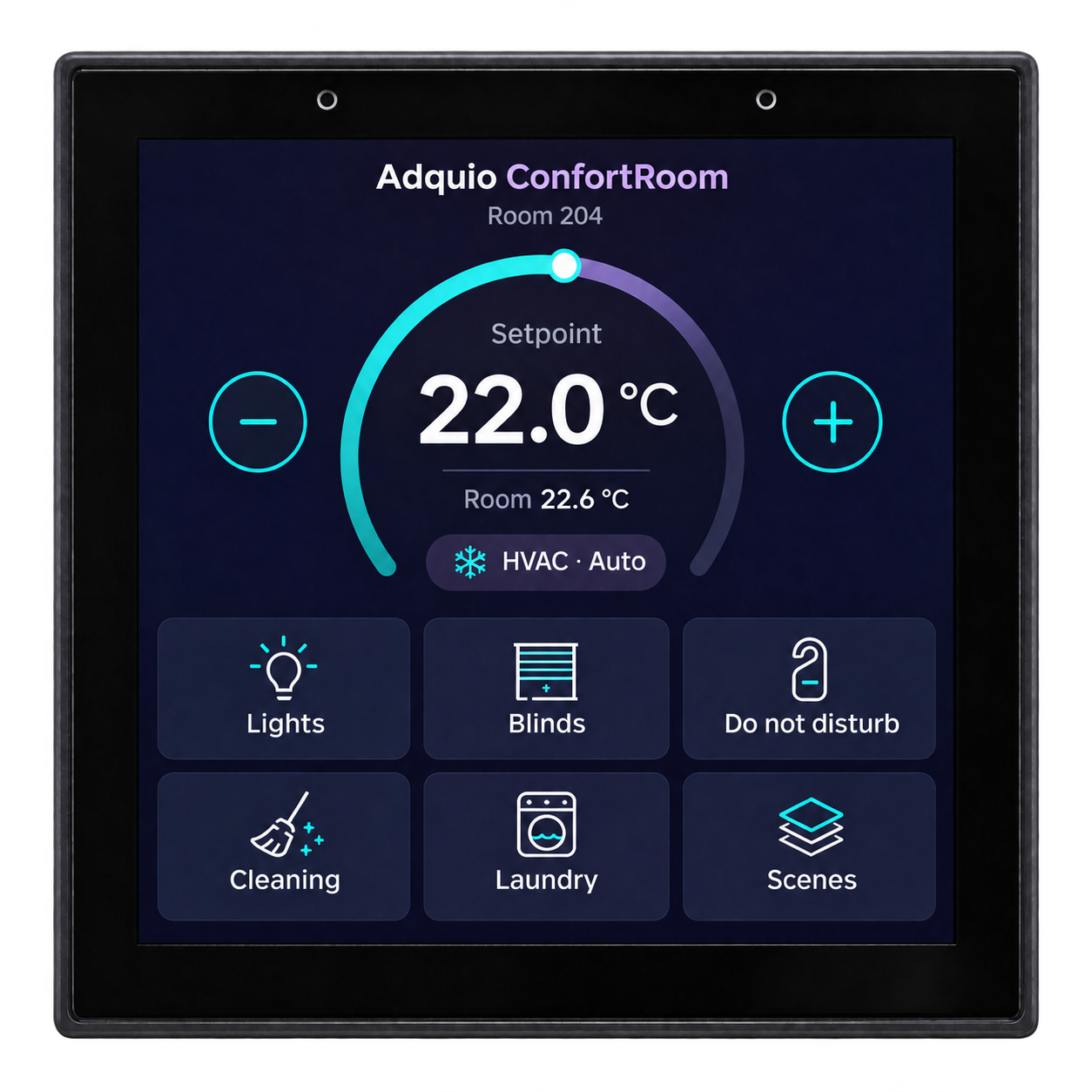
ConfortRoom combines temperature measurement, control and user interaction. Its interface and logic can be adapted to the role required in each space.
The integrated sensor provides the room temperature. Display its reading, the setpoint and the controls defined for the project’s HVAC system.
Add lighting, blind, scene and service-request controls. Organise access according to the needs of guests, users or staff.
Select Ethernet, Wi-Fi or RS-485 and communicate using Modbus or BACnet. The serial port’s role and control functions are defined in software.
The image shows a design proposal: prominent temperature and setpoint, with room functions below. Layout, statuses and actions are adapted to the project. After a period without screen touches, the screen enters a low-brightness mode: it stays on with reduced brightness to avoid disturbing people at night.
COMFORT
Room temperature, setpoint, mode and settings for integrated equipment. Regulation is configured according to the thermal system being controlled.
AMBIENCE
Switching, dimming and scene selection through the controller and the project’s lighting technologies.
SOLAR SHADING
Commands and statuses for compatible devices, with the permissions and priorities defined for the room.
PRIVACY AND SERVICE
A clear state for guests that can be shared with building interfaces or services through integration.
GUEST SERVICES
Buttons generate requests or states for the hotel’s service workflows. Receiving and managing those requests is integrated with the selected systems.
CUSTOMISATION
Adapt labels, access, statuses and functions to hotels, homes, offices and other spaces. Show each user what they need to operate.
Choose the connection according to the available network, the equipment to be controlled and the control architecture. ConfortRoom combines IP integration and serial communication according to its configuration.
WIRED NETWORK
Wired network communication and power through PoE. An option for providing data and power to the device through the same cable.
SERIAL COMMUNICATION
A port that can operate as master or slave according to the requirements and software. Use it to control compatible equipment or participate in a bus.
WIRELESS NETWORK
Wireless connection to the building’s infrastructure. For an installation without PoE power, use the 12 V DC input.
The hotel’s network can use a dedicated SSID and VLAN segmentation defined in its communications infrastructure. Select the topology and access according to the building’s network management.
The diagrams show alternative integrations. Each project defines device roles, power, variables and the functions exchanged.
01 · ETHERNET AND LOCAL EQUIPMENT
Installation data and setpoints.
Measurement, interface and configured control.
Input and output signals.
Valves and speeds according to the equipment.
In this architecture, Ethernet connects ConfortRoom to the installation and RS-485 is configured as master for the Adquio Mini IOs. The module provides the signals required by the fan coil, with suitable wiring, actuators and logic for the equipment.
02 · MULTIPLE ROOMS ON ONE BUS
Bus master in a Modbus RTU example.
Temperature, setpoint and statuses.
Other rooms on the same bus.
In a Modbus RTU example, thermostats can be configured as slaves of a controller. A BACnet MS/TP architecture defines their participation in the corresponding network. Each device requires its own power supply and suitable bus configuration.
03 · NO ETHERNET CONNECTION IN THE ROOM
12 V DC power supply.
2.4 GHz access.
Integrated variables and functions.
Power ConfortRoom at 12 V DC and use the building’s 2.4 GHz Wi-Fi network for IP communication. Integration can share variables with the controller or compatible supervision systems.
Share the necessary variables and functions with the project’s tools. The thermostat provides the local interaction point; each platform adds its speciality.
Adquio controllers allow the room to be coordinated with Casambi networks, KNX installations and other technologies through their integrations.
Adquio SCADA can display statuses and operate integrated functions. Adquio Supervisor helps organise compatible technical infrastructure.
Adquio Analytics provides dashboards and data trends. Adquio Cloud BMS supports the management of multiple sites.
In hotels and hospitality, relate the interface to room workflows. Connecting bookings, a PMS or services requires the corresponding integrations to be defined and developed; Adquio.API provides authorised access to ecosystem variables.
Explore the equipment views and prepare the connections needed for the installation.


ConfortRoom is powered at 12 V DC or through PoE. Use this product page’s specifications to define wiring, the RS-485 port’s role and the network connection.
Review the connections and functions required by the project. External equipment is controlled through its interfaces, input/output modules and integration logic.
| Feature | Capability | Application |
|---|---|---|
| Temperature | Integrated temperature sensor | Local reading for thermostat functions. |
| Interaction | 4″ touchscreen | Customisable HVAC and room interface. |
| Screen dimming | Low-brightness mode after inactivity | Reduces brightness when no screen touches are detected, without switching off, to avoid disturbing people at night. |
| Wired network | Ethernet with PoE | IP communication and power over Ethernet. |
| Wireless network | 2.4 GHz Wi-Fi | IP communication through the building’s network. |
| Serial port | 1 RS-485 port | Master or slave according to software configuration. |
| Modbus | Modbus TCP and Modbus RTU | Integration over IP or RS-485. |
| BACnet | BACnet/IP and BACnet MS/TP | Integration over IP or RS-485. |
| Power supply | 12 V DC or PoE | Selection according to the installation method. |
Common decisions when preparing a connected room.
After a period without detecting screen touches, ConfortRoom dims the screen and enters a low-brightness mode. The screen stays on with reduced brightness to avoid disturbing people at night.
The integrated temperature sensor enables thermostat use. The screen and programming can also include room controls, scenes and service requests.
It can participate in regulation and manage compatible modules such as Adquio Mini IOs. Electrical operation of valves or fans is handled by the inputs, outputs and components suitable for the fan coil.
Yes. It can be powered at 12 V DC and communicate through 2.4 GHz Wi-Fi. It can also participate in RS-485 serial integration according to the defined architecture.
Yes. Software determines its use according to installation requirements. Each device’s role and protocol are configured for the selected architecture.
It is an illustrative proposal for a customisable interface. Functions, text and layout are adapted to the project and its integrations.
Tell us which HVAC equipment you need to control, what network is available and which functions you want on screen. We can help select the architecture and prepare an interface suited to your users.
