Imagine being able to see what is happening in every part of a building, check that everything is working properly and control its installations from a single screen. Without walking down corridors, inspecting equipment one by one or needing programming knowledge.
That is precisely what a SCADA system makes possible.
Although the name may sound complicated, how it works is much easier to understand than you might think.
And a technology that was associated for years with large factories and industrial facilities can now transform how we manage offices, hotels, hospitals, shopping centres and almost any building.
First, what does SCADA mean?
SCADA stands for Supervisory Control and Data Acquisition.
Let’s set the technical terminology aside for a moment.
SCADA is a system that lets you see what is happening in an installation, check the status of its equipment and operate it through a visual interface.
Imagine your building could talk to you.
It might say:
- “The temperature on the third floor is too high.”
- “Lights are on in an area where nobody is present.”
- “Electricity consumption is increasing.”
- “A water pump has stopped working.”
- “All installations are working correctly.”
And you could reply:
- “Reduce the temperature to 22 degrees Celsius.”
- “Switch off the lighting in that area.”
- “Show me how much energy we have used this week.”
- “Activate the standby pump,” if one is available and configured for that purpose.
That is what SCADA does: it turns a building’s technical information into something people can understand and use.
An example: an office building you can control from one screen
Imagine a five-storey office building.
Each floor has lighting, heating and cooling, temperature sensors and electricity meters.
With traditional building management, maintenance staff need to visit different areas to check what is happening.
If someone reports that a room is too cold, they have to locate the problem.
If the lights on a floor are left on, somebody has to notice.
And if a piece of equipment fails at the weekend, nobody may discover it until Monday.
Now imagine the same building with SCADA.
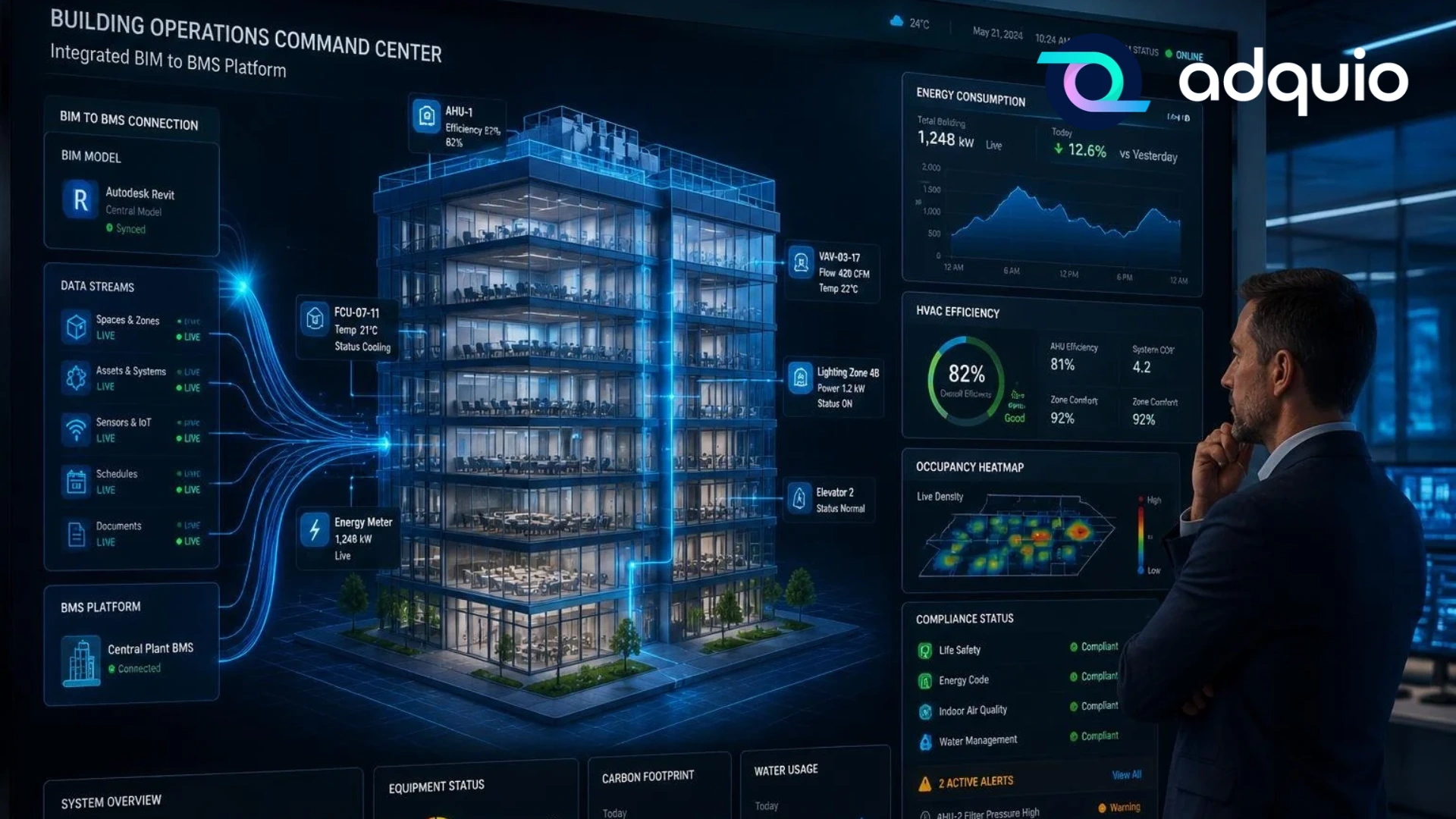
A screen displays a floor plan of the building and its five storeys.
Each area shows its temperature, lighting status and connected equipment.
Areas operating normally retain their usual appearance. Any issue can be highlighted visually.
The person in charge selects the third floor.
A more detailed floor plan appears immediately. They can check the temperature in each room, see which lights are on and check how the equipment is operating.
If they need to make a change, they can do it directly from the screen, provided the appropriate permissions and controls are available.
Tasks that previously required site visits, inspections and several tools can now be handled from one place.
This is technology available today.
What can SCADA display and control?
Almost any installation whose equipment can communicate information and accept commands through a suitable integration.
Lighting: every light under control
Imagine a shopping centre with hundreds or thousands of luminaires.
Through SCADA, the operator can see which areas are lit, adjust lighting levels or activate different scenes.
For example, an opening scene can prepare the shopping areas before visitors arrive.
A closing scene can reduce lighting in selected areas.
And maintenance staff can locate a luminaire or group that is not responding, where the equipment provides that information.
All of this can be done without physically accessing every device.
HVAC: comfort while staying in control
Heating, cooling and ventilation account for a significant share of energy consumption in many buildings.
SCADA can display temperatures, setpoints, operating states and alarms from integrated equipment.
If a room is too warm, the operator can check what is happening.
If a unit is running outside its schedule, they can spot it.
And, where conditions allow, they can adjust setpoints or operating commands.
This makes it easier to find the balance between comfort and energy consumption.
Energy: understand what is happening with consumption
Suppose your building’s electricity bill rises considerably.
Do you know which installation is using more energy?
HVAC? Lighting? Equipment that keeps running at night?
With suitable metering, SCADA lets you review consumption, power readings and trends.
You have real information to work with.
And when you can see where energy is being used, it becomes much easier to identify where to act.
Water, pumps and other installations
SCADA can also monitor tanks, pressure booster sets, circulation pumps, irrigation systems and other technical installations.
For example, it can display a water tank’s level, a system’s pressure or a pump’s status.
If something operates abnormally, it can generate an indication or alarm.
Alarms: identify problems before they grow
One of SCADA’s biggest benefits is having a centralised view of incidents.
An out-of-range temperature, disconnected equipment or an installation that is not responding can trigger alerts.
This helps technical staff locate problems and respond more quickly.
It does not mean SCADA can predict every failure or resolve it automatically, but it provides information to manage problems more effectively.
The big difference: you can see your building instead of interpreting numbers
This is one of the most useful features of modern SCADA.
Technical systems work with values, addresses, states and signals that many people do not know how to interpret.
SCADA can represent that information on something we all understand: a floor plan, an image or a visual representation of the building.
Imagine opening a screen and seeing your hotel’s floor plan.
- Rooms display their temperatures.
- Shared spaces show whether the lighting is on.
- The plant room shows equipment status.
- Meters display consumption.
- Incidents are marked where they occur.
You can select a room to see more information, check its equipment or change a parameter.
You no longer need to understand the technical details of how the devices communicate.
You only need to understand your building.
What is the difference between SCADA and a BMS?
This is a common question because the two concepts are closely related.
In our previous article, we explained that a BMS (Building Management System) coordinates the management of a building’s installations.
SCADA can form part of that solution.
A simple way to explain it is:
The BMS manages how the building operates. SCADA lets you visualise, monitor and control it.
A BMS can include automation, energy-saving strategies, coordination between installations and management tools.
SCADA focuses particularly on presenting operational information and enabling users to take action.
These are not mutually exclusive categories: many solutions incorporate both roles, and some SCADA systems also run automation or record historical data.
What matters is what the technology enables you to do.
Do you need a huge building to use SCADA?
Not at all.
Although SCADA originated in the supervision of complex industrial processes, its principles work just as well in buildings of different sizes.
For example:
A small hotel: can display room status, control shared spaces and monitor HVAC and consumption.
An office building: can manage lighting, temperatures and equipment from a single interface.
A museum: can control lighting zones, select scenes and monitor environmental conditions.
A car park: can show which areas are lit, monitor sensors and manage different operating modes.
A high-specification home: can integrate lighting, HVAC, blinds, a swimming pool and other installations in a custom interface.
A retail chain: can use SCADA in its stores and, with the appropriate platforms, centralise their supervision.
The size of the building is only part of the question.
The key question is: would it be useful to understand and control your installations from one place?
Do I need to replace the equipment I already have?
Not necessarily.
Many buildings have equipment that can communicate through protocols such as Modbus, BACnet, KNX and DALI, or lighting systems such as Casambi.
With suitable controllers, gateways and integrations, information can be collected from this equipment and made available to SCADA.
This allows you to use existing installations and extend their capabilities without replacing everything.
Of course, compatibility needs to be assessed for each project.
The fundamental idea is that a building can become smarter by making use of much of the technology already installed.
On-site SCADA or SCADA in the cloud?
There are several ways to deploy a SCADA system today.
On-site SCADA: control stays in the building
In this model, the software runs on a server located within the installation itself.
This allows local supervision and control to continue without a permanent Internet connection, as long as the local network and equipment remain operational.
It is a useful option when you want operations to remain within the building’s infrastructure.
SCADA Cloud: access from anywhere
With a cloud-hosted SCADA system, the supervision platform is available over the Internet.
This makes authorised remote access possible from different locations and devices.
It can be particularly useful for companies that need to access their installations from several locations.
The choice depends on operational needs, security requirements, connectivity and the architecture of each project.
Can SCADA help me save energy?
Yes, but it is important to understand how.
Simply installing SCADA does not save energy. Savings come when the information it provides enables better decisions or more efficient control.
Imagine discovering that the lights on one floor are left on unnecessarily for six hours every night.
Or that an HVAC unit keeps running at weekends.
Or that a room is being heated and cooled at the same time because of an incorrect configuration.
SCADA can help you identify these situations and, where the system is configured to do so, correct them through commands, schedules or automation.
Historical data also lets you check whether the improvements are working.
Technology makes a good energy strategy easier to implement and monitor.
Is SCADA difficult to use?
It does not have to be.
A well-designed SCADA system should suit the people who will use it.
A maintenance manager needs detailed technical information.
A hotel manager may simply need to know whether the installations are working correctly.
A lighting operator may need floor plans, scenes and controls.
That is why being able to customise the interface matters so much.
Filling a screen with buttons, numbers and charts is not enough.
The goal is to show each person the information they need in a way they can understand.
The best technology makes people’s work easier.
How do we do it at Adquio?
At Adquio, we develop solutions that connect technologies and turn them into systems that are easy to monitor and control.
Our ecosystem integrates different installations through controllers, gateways and software tools.
For visualisation and control, we offer two options:
An on-site, web-based SCADA platform for creating fully customised monitoring and control interfaces.
It can represent installations on floor plans, display real-time values, include trend charts and provide both overall and individual control of integrated elements.
All running within the installation itself.
Provides SCADA visualisation and control capabilities through a cloud-hosted platform.
It enables remote access to installations without maintaining a dedicated on-site SCADA server.
Much more than a control screen
SCADA belongs to an ecosystem of complementary tools.
With Adquio Analytics, we can explore data in greater depth, create indicators and study changes in consumption over time.
With Adquio Supervisor, we can check device status and support the technical management of the infrastructure.
And with Adquio Cloud BMS, we can manage multiple buildings and installations centrally.
Each tool has its own speciality, but they all share the same goal: making buildings easier to understand, manage and improve.
So, does my building need SCADA?
Ask yourself these questions:
- Can I check the status of all my installations from one place?
- Do I know which equipment is running right now?
- Can I easily spot an incident?
- Can I operate my installations without physically visiting each device?
- Do I have a clear, understandable representation of what is happening in the building?
If you answered “no” to several of these, SCADA could offer important benefits.
You do not need an enormous or especially complex installation.
You could simply manage what you already have more effectively.
Your building has a lot to tell you. It just needs a way to do it.
For years, we have installed increasingly advanced equipment in our buildings.
Sensors that measure temperatures, meters that record consumption, controllers that manage lighting and systems that regulate heating and cooling.
All of them generate valuable information.
Yet that information too often remains hidden within individual devices, where it cannot easily be used.
SCADA changes that.
It makes the invisible visible. It turns data into understandable information. And it transforms that information into the ability to take action.
Knowing how a building operates, what is happening and what we can do to improve it makes a real difference.
At Adquio, we believe controlling a building should be as simple as understanding it.
That is precisely the purpose of our SCADA systems.
Would you like to see your building from a completely new perspective?
Discover our solutions at adquio.com and tell us which installations you need to monitor.
Your building may already have everything it needs to get started. All that remains is to connect the pieces.
Let’s discuss your installation
Tell us what you need to visualise, monitor and control.